
Open the same context in the browser
Outcome
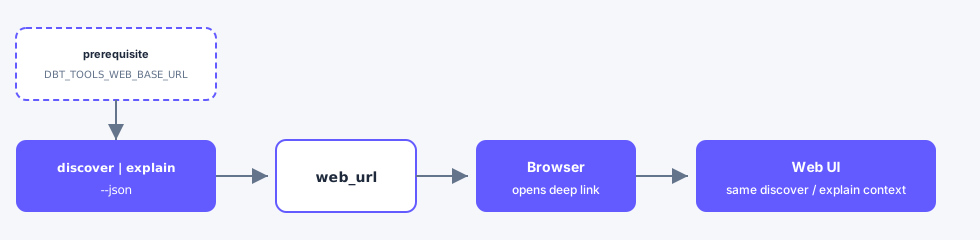
A web_url (and review_url) from CLI JSON opens the web UI on the same Inventory query or resource you analyzed in the terminal.
When to use this
| Surface | Use when |
|---|---|
| CLI | You already ran discover, explain, or impact and want a shareable browser view |
| MCP | Skip—use CLI for handoff URLs or open the web app manually |
| Web | Destination of the deep link |
MCP is skipped for this handoff; use CLI JSON or open the web app manually.
Steps
- Start
dbt-tools-web, exportDBT_TOOLS_WEB_BASE_URLto its origin (deep links). - Run
discover,explain, orimpactwith--json. - Copy
web_url(orreview_url) from the JSON payload into a browser (or follow the human “Open in web” line).
Published npx @dbt-tools/web listens on 3000. Vite dev (pnpm dev:web) uses 5173. Set the env var to the origin the process printed.
Example
bash
export DBT_TOOLS_WEB_BASE_URL=http://127.0.0.1:3000
dbt-tools discover --dbt-target ./target "orders" --json
dbt-tools explain model.my_project.orders --dbt-target ./target --json
dbt-tools impact model.my_project.orders --dbt-target ./target --json
Typical Inventory URLs:
text
http://127.0.0.1:3000/?view=inventory&q=orders
http://127.0.0.1:3000/?view=inventory&resource=model.my_project.orders&assetTab=summary
http://127.0.0.1:3000/?view=inventory&resource=model.my_project.orders&assetTab=lineage