
Same discovery everywhere
dbt-tools uses one ranking contract for resource discovery across the CLI and the web investigation UI. The goal is the same question—“which resource did you mean?”—with the same reasons, not two different search implementations.
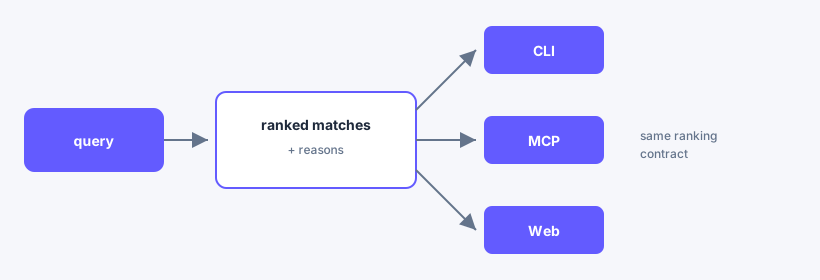
Coding agents and scripts use the same ranking via CLI or MCP; the figure shows CLI, MCP, and Web as the parity set.
Shared behavior
- CLI
dbt-tools discoverreturns ranked matches with scores,reasons, and optional disambiguation hints. - Web Inventory and header search use the same ranking contract as the CLI, so terminal and browser results stay aligned.
- Query tokens such as
type:model,tag:, and package filters align between CLI flags and inline tokens.
Why it matters
- Operators can start in the terminal and continue in the browser without re-guessing names.
- Coding agents and scripts get stable JSON they can replay in the UI via deep links (
view=inventory&q=). searchremains available for legacy-style output;discoveris the explainable, preferred path for new workflows.
Try it
- Find a model with the CLI.
- Open the web app and run the same query in Inventory or header search.
- Set
DBT_TOOLS_WEB_BASE_URLand use Open in web for one-click handoff.