
Local and remote artifacts
dbt-tools is local-first: the default path is a dbt target/ directory on disk. Remote object storage is supported when you explicitly configure it—credentials stay on the Node side, not in the browser.
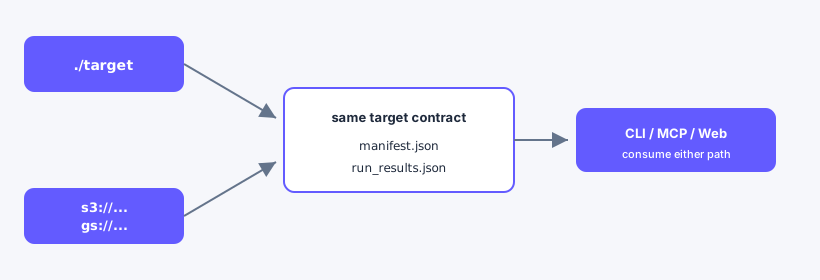
Web upload / preload stays in the Modes table; the figure is URI/path pointing only.
Modes
| Mode | Typical use |
|---|---|
Local target/ | Developer loop, CI artifact download, dbt-tools-web --dbt-target or --target |
| Remote S3/GCS | Investigating scheduled runs in a bucket (s3://…, gs://… as --dbt-target) |
| Load artifacts | In-app switch after startup: Local / S3 / GCS path or URI (server-mediated, not file upload) |
Target URIs (CLI and MCP)
# Local
dbt-tools status --dbt-target ./target

# S3 — scheme required (unschemed paths are treated as local)
dbt-tools status --dbt-target s3://my-bucket/dbt/prod

# GCS
dbt-tools status --dbt-target gs://my-bucket/dbt/prod
Required objects at the prefix root: manifest.json and run_results.json (same contract as local target/).
Credentials (Node only)
Configure the CLI, MCP, or web server process—not the browser.
| Provider | Typical setup |
|---|---|
| S3 | AWS_ACCESS_KEY_ID / AWS_SECRET_ACCESS_KEY, AWS_PROFILE, or instance role; optional DBT_TOOLS_S3_REGION, DBT_TOOLS_S3_ENDPOINT |
| GCS | GOOGLE_APPLICATION_CREDENTIALS or application default credentials; optional DBT_TOOLS_GCS_PROJECT_ID |
GCS impersonation (read-only)
For gs:// targets, use a dedicated service account via impersonation (read-only access):
| Setting | CLI / MCP / Web |
|---|---|
DBT_TOOLS_GCS_IMPERSONATE_SERVICE_ACCOUNT | Service account email to impersonate (gs:// only) |
DBT_TOOLS_GCS_PROJECT_ID | GCP project ID for the GCS client |
--gcs-impersonate-service-account | Same as env; set at MCP or web server startup (not via MCP set_target) |
MCP client example:
{
  "mcpServers": {
    "dbt-tools": {
      "command": "npx",
      "args": ["-y", "@dbt-tools/mcp", "--dbt-target", "gs://my-bucket/dbt/prod"],
      "env": {
        "DBT_TOOLS_GCS_PROJECT_ID": "my-gcp-project",
        "DBT_TOOLS_GCS_IMPERSONATE_SERVICE_ACCOUNT": "reader@my-project.iam.gserviceaccount.com"
      }
    }
  }
}
CLI: the same DBT_TOOLS_* variables apply for gs:// targets—see Configuration.
CLI and MCP
- Pass
--dbt-targetorDBT_TOOLS_DBT_TARGETto a directory or remote URI. statuschecks filesystem or downloaded copies before parse-heavy commands.- Large remote manifests benefit from MCP resident cache when coding agents issue many queries.
Web
dbt-tools-web uses the same startup flags as MCP for artifact root and remote clients (--dbt-target, --gcs-impersonate-service-account, --s3-region, etc.). See Web server CLI.
--dbt-target/DBT_TOOLS_DBT_TARGET— preload local,s3://, orgs://at server start.--target/DBT_TOOLS_TARGET_DIR— local directory alias (backward compatible).- Load artifacts (in-app) — choose Local, S3, or GCS; enter a path or URI; Scan location, then Load workspace. The server lists the location; this is not a browser file upload. Env
DBT_TOOLS_GCS_*/DBT_TOOLS_S3_*apply when scanning remote sources. UI can pass GCS impersonation per request.
Credentials stay on the Node process; the browser uses /api/... routes only. See Web getting started.
Remote poll: after a remote workspace is loaded, the app polls about every 30s. When a newer complete artifact pair appears, a banner shows Remote update available with Load latest remote run. The current investigation stays loaded until you switch—there is no auto-switch.
Web server example (GCS):
npx @dbt-tools/web \
  --dbt-target gs://my-bucket/dbt/prod \
  --gcs-project-id my-gcp-project \
  --gcs-impersonate-service-account reader@my-project.iam.gserviceaccount.com
Learn more
- Configuration
- MCP tools
- Troubleshooting — remote and empty target issues