
dbt artifacts & target/
dbt-tools analyzes structured JSON outputs from dbt runs. The primary inputs are manifest.json and run_results.json at the root of a dbt target directory (local ./target or a remote prefix with the same file names).
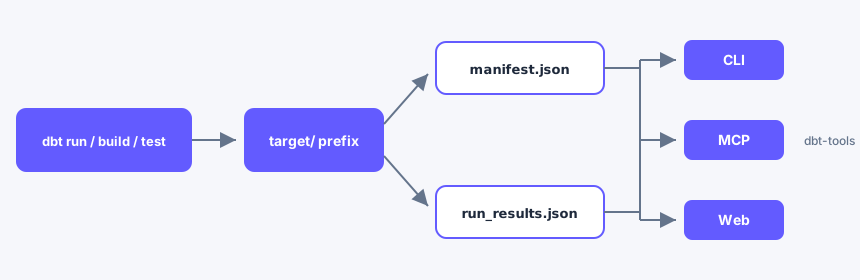
Coding agents use agent skills that invoke CLI or MCP; skills do not read artifacts themselves.
Remote s3:// and gs:// prefixes use the same file names at the prefix root—see Local and remote artifacts.
When artifacts appear
| dbt command | Typical artifacts | dbt-tools status |
|---|---|---|
dbt compile | manifest.json (and related compile outputs) | manifest-only — graph and configs, no run results |
dbt run, dbt build, dbt test | manifest.json + run_results.json | full — execution timing, status, and per-node results |
If the Web UI is empty or execution views are missing, you may be on a manifest-only target. Run a command that produces run_results.json, or point at a directory that already has both files. See Troubleshooting and Web UI shows empty views.
What each file is (dbt-tools lens)
| Artifact | dbt produces | dbt-tools uses it for |
|---|---|---|
manifest.json | Project graph, configs, compiled SQL metadata | discover, explain, deps, lineage in Web |
run_results.json | Per-node status, timing, adapter messages | Failed nodes, slow-run ranking, execution timeline |
catalog.json | Warehouse column metadata | Optional enrichment when present |
sources.json | Source freshness results | Optional; freshness checks are run by dbt, not dbt-tools |
Schema versions depend on your dbt release. See Version compatibility for supported artifact versions—do not assume a single schema across all projects.
Target layout
Tools expect a dbt target directory (typically ./target) with manifest.json and run_results.json at the root of that location. Remote object storage follows the same one-pair-per-location contract—see Local and remote artifacts.
dbt Docs site vs JSON artifacts
Two different outputs are often confused:
dbt docs generate+dbt docs serve— human-readable project documentation (HTML) for stakeholders and analysts.manifest.json/run_results.json— machine-readable artifacts undertarget/that dbt-tools parses.
dbt-tools does not read the HTML docs site; it reads JSON artifacts from a local path or remote prefix. For building and viewing dbt Docs, see Build and view your docs on docs.getdbt.com.
Nodes, unique_id, and discovery
A node is a resource dbt tracks: models, sources, tests, seeds, snapshots, and more. Each node has a stable unique_id such as model.my_project.orders (package and name segments match dbt’s artifact format).
- dbt selection (
dbt run --select ...) chooses what dbt executes on the next run. See Node selection syntax for upstream grammar—this site does not document full selector syntax. - dbt-tools
discoverranks resources in already-produced artifacts using tokens liketype:model. Intent and parity with CLI/Web are described in Discovery parity.
After a dbt run, check readiness and find resources:
# After a dbt run, check readiness
npx @dbt-tools/cli status --dbt-target ./target --json

# Find resources; note unique_id in output
npx @dbt-tools/cli discover --dbt-target ./target "orders" --limit 5 --json

# Explain one node by unique_id
npx @dbt-tools/cli explain model.my_project.orders --dbt-target ./target --json
Example discover output shape (synthetic IDs only):
{
  "matches": [
    {
      "unique_id": "model.my_project.orders",
      "resource_type": "model",
      "name": "orders"
    }
  ]
}
Sources and freshness
- Sources appear in
manifest.jsonassource.*nodes. Lineage and dependency commands treat them like other graph nodes. - Freshness is configured and evaluated in dbt (
dbt source freshness); results may appear insources.jsonwhen present. - dbt-tools may surface source metadata from artifacts; it does not run warehouse freshness checks.
See Sources on docs.getdbt.com for freshness configuration.
Parsing boundary
Artifact parsing and type definitions come from the external dbt-artifacts-parser npm package. This repository owns analysis, CLI, MCP, and web layers on top of that parser.
Safe examples
Documentation and public sites must use synthetic project names and metadata. Do not paste real warehouse credentials, customer data, or production manifests into examples.